The AI Comic Factory Alternative for Comics You Can Actually Edit
AI Comic Factory generates a flat page you can't change. Comic Creator keeps every character, background, and speech bubble editable — and your cast stays consistent.
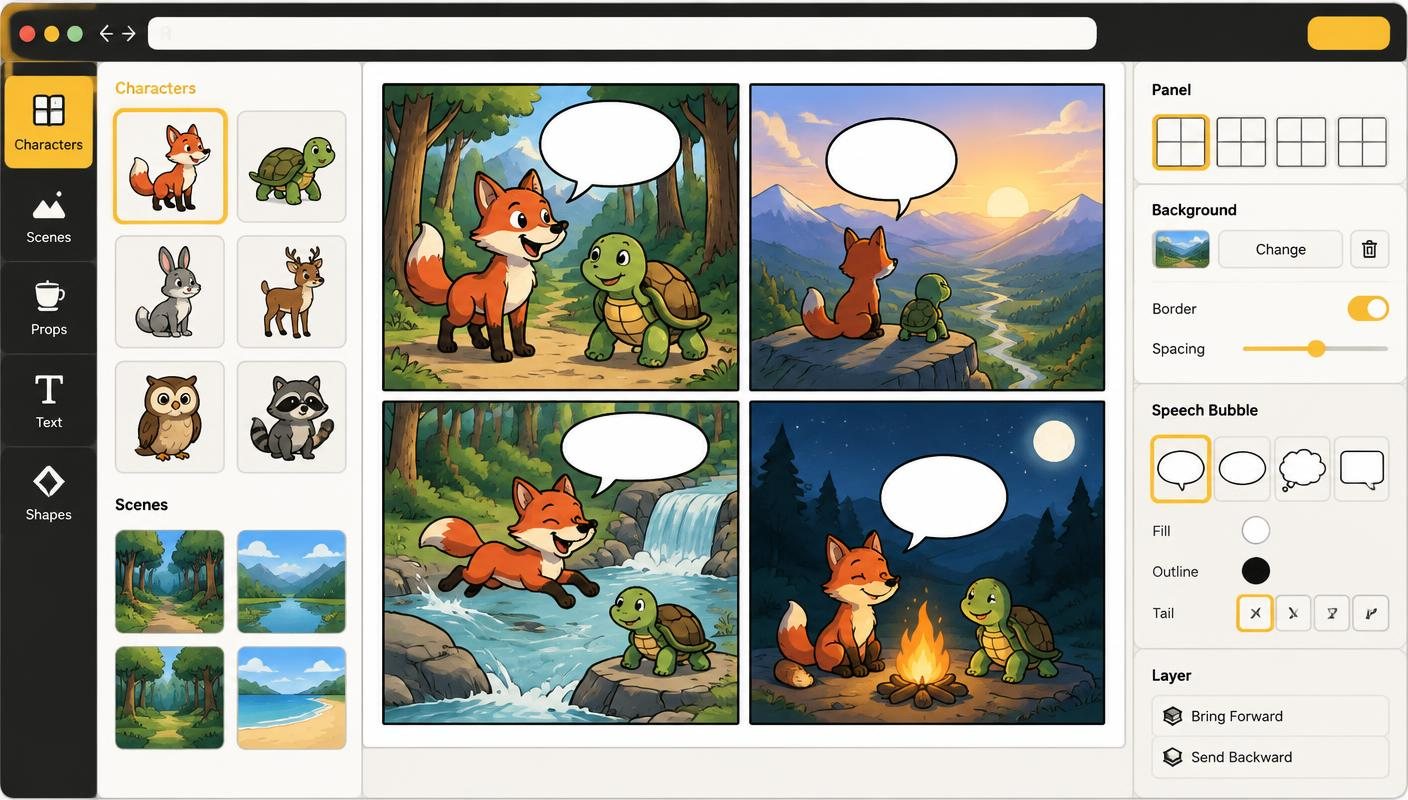
AI Comic Factory earned its popularity: it's free, needs no signup, and turns a one-line premise into a comic page in seconds. For a quick laugh or a story idea sketch, it's genuinely fun.
But the output is a flat image. Captions are baked into the art, characters drift between panels, and there's no way to fix one panel without regenerating the whole page. The project is also in maintenance mode — its code repository was archived in late 2025. If you want a comic you can revise, letter properly, and export, you need a tool built for editing, not just generating.
How it works
- Write or Paste Your Story — Start from a prompt or a full script. Comic Creator plans panels, shots, and dialogue before any art is generated.
- Build a Consistent Cast — Save characters to your library with reference images, so the hero in panel 1 is recognizably the same hero in panel 12.
- Edit Every Layer — Characters, backgrounds, and speech bubbles are separate elements. Move them, restyle them, or regenerate one panel without touching the rest.
- Letter & Export — Add real, editable speech bubbles, captions, and sound effects — then export the full page, separate panel PNGs, or a PDF.
Features
- Editable Panels, Not Flat Images — Every element on the canvas stays movable and changeable after generation. Fix one panel without re-rolling the page.
- Character Consistency — A character library with reference sets keeps your cast on-model across every panel and every comic in a project.
- Real Lettering Tools — Speech bubbles, captions, and SFX are editable text with proper tails and placement — not text baked into the artwork.
- Script-to-Comic Workflow — Paste a script and get a planned page — shot types, locations, and dialogue — that you review before generating.
- Style Guides — Lock palette, line weight, and mood so a whole project shares one visual language.
- Actively Developed — Comic Creator is under active development, with new generation, layout, and export features shipping regularly.
FAQ
Is AI Comic Factory still available?
Yes — the Hugging Face Space still runs and is free with no signup. Its code repository was archived in late 2025, so it is in maintenance mode rather than active development.
Why do AI Comic Factory characters look different in every panel?
Each panel is generated as an independent image with no memory of the others. Comic Creator solves this with saved character references that guide every new pose and scene.
Can I edit the text in an AI Comic Factory page?
Not directly — captions are part of the generated image. In Comic Creator, all lettering is editable text you can move, reword, and restyle at any time.
Is it really free to start?
Yes. You can create your first comic without a credit card. Paid plans unlock more AI generations, projects, and export options.
Do I need to know how to draw?
No. Comic Creator generates panels, characters, and backgrounds from text prompts. If you can describe a scene, you can make a comic.
Can I use the comics commercially?
Yes. Review the current terms and your plan details before using generated work commercially.