ComicAI Alternative: Comic Creator
Build an AI comic you can keep revising: reusable characters, editable dialogue, and multiple pages in one workspace.
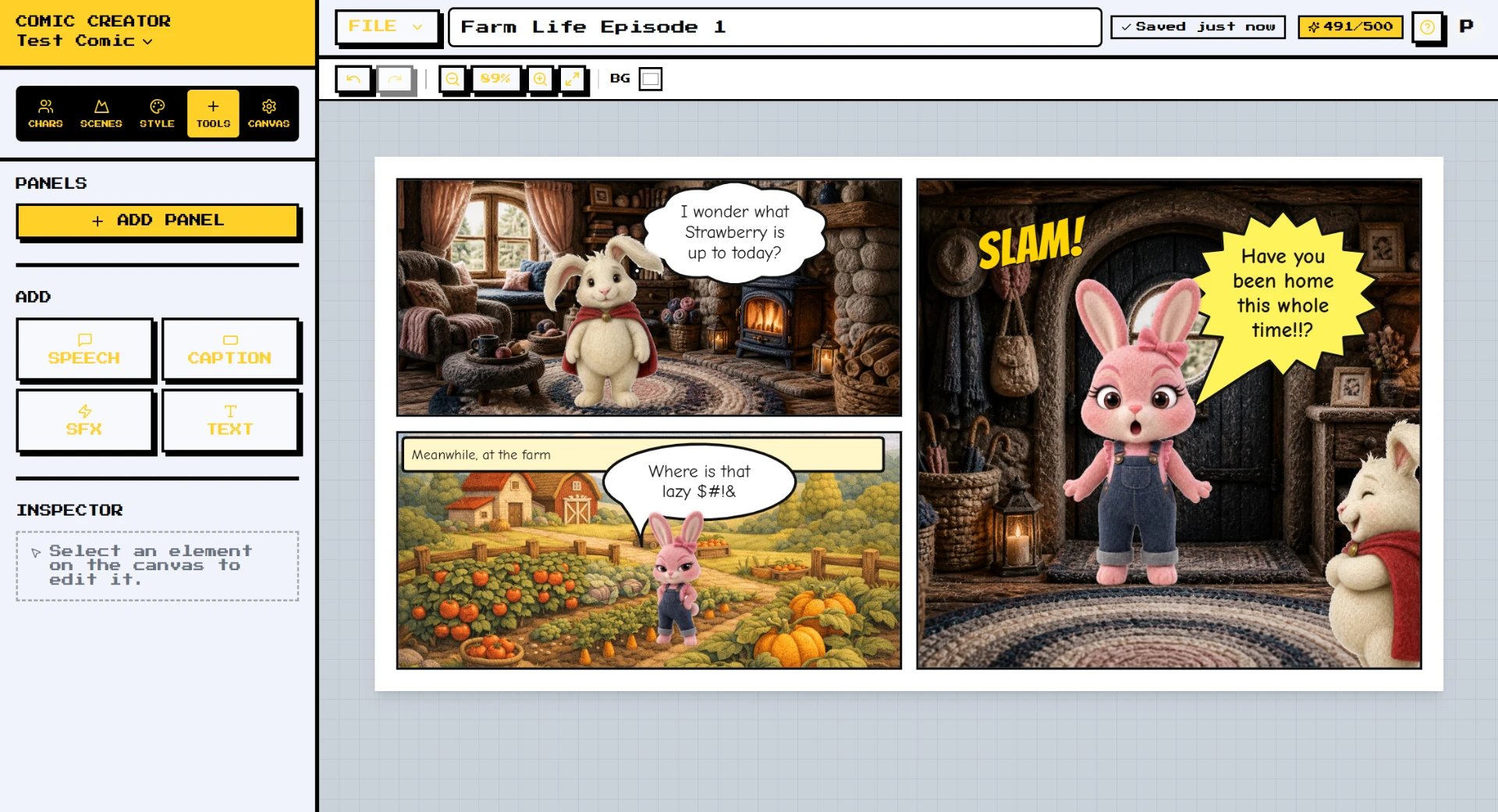
If you are looking for a ComicAI alternative, first check which product you mean. The original Comicai announced a rebrand to SkyReels in April 2024. Today, comicai.ai displays a parked-domain page, while SkyReels promotes video generation. A separate live product at comicai.com identifies its owner as Kawaii, Inc.; we could not verify continuity with the original Comicai.
The comparison below refers to the current comicai.com product. It advertises story-to-comic generation, character-reference uploads, selectable layouts, and multiple art styles. Those are useful comic-making capabilities—not just a generic image generator. Its public pages do not establish how much layer-level editing is available after generation, so we do not assume it lacks editing tools.
Comic Creator is worth trying if your priority is revision: keeping speech bubbles separate from artwork, reusing a cast across comics, and managing an ordered set of editable pages. Both approaches involve AI output that needs review; character references help, but do not guarantee an identical character in every shot.
How it works
- Start with one short scene — Choose a style guide, then create a character and a background. A three- or four-panel conversation is a manageable first test.
- Choose how each panel is made — Arrange backgrounds and character stickers separately, or use a generated full-scene image. Full-scene artwork stays a single image; it does not become independently movable characters.
- Revise the dialogue and pacing — Add speech, thoughts, captions, or sound effects as editable lettering. Change words and bubble placement without generating the artwork again.
- Review the page before exporting — Check character details, reading order, and text size. Starter and Pro include whole-comic PDF and page-PNG ZIP exports, alongside page and panel options.
Features
- Lettering separate from the art — Speech bubbles, captions, and sound effects remain editable text. A dialogue revision does not require a new image.
- Reusable characters and scenes — Keep a project library and generate new poses or expressions. Character reference sets are available on Starter and Pro.
- Layered or full-scene panels — Choose movable character stickers over a background when placement matters, or a flat generated scene for a composed shot.
- Multi-page comics — Add, duplicate, reorder, and delete pages. Free supports up to 4 pages per comic; Starter 24 and Pro 64.
- Reviewable script planning — Plan shots, locations, characters, and dialogue before rendering. The script workflow lets you review panel generation choices rather than hiding them.
- Character-only touch-ups — Mask part of a character image and request a change with Fix Part. Each edit costs 1 credit; reverting to a saved image version costs nothing.
Who it is for
- Choose ComicAI for a generation-first trial — Its current site offers story input, reference photos, layout choices, and multiple styles. Try one complete result and inspect its editing and download options before purchasing credits.
- Choose Comic Creator for dialogue revisions — If wording and bubble placement change often, separate lettering lets you revise them without paying for another art generation.
- Choose Comic Creator for recurring stories — Keep comics, characters, backgrounds, and a shared style guide in a project. Multi-page editing is built in; dedicated series/issue grouping is not yet available.
- Switch without expecting a perfect import — Bring exported PNG or JPG artwork into Comic Creator as images. There is no direct ComicAI project importer, and flattened artwork cannot recover its original layers or text.
Comic Creator vs ComicAI
| Feature | Comic Creator | ComicAI |
|---|---|---|
| Story and art workflow | Manual panel assembly or reviewable script-to-comic planning | Story-to-comic generation with selectable panels and layouts |
| Character references | Saved character library; reference sets on Starter and Pro | Optional character photos; four reference slots shown in the creator |
| Editing after generation | Movable sticker/background layers; full scenes stay flat images | Layer-level editing could not be verified from public pages |
| Speech bubbles and captions | Separate, editable lettering with shape and tail controls | Post-generation text editing could not be verified |
| Multiple pages | Ordered pages with add, duplicate, reorder and delete | Panel/layout selection advertised; multi-page project management unverified |
| Free allowance | 20 lifetime generations and 1 regular saved comic; starter examples are exempt | Creator displays a 2-credit trial balance; verify account eligibility |
| Generation costs | Starter $9/month for 150 generations; Pro $29/month for 500 | Low 1 credit, Standard 4, Pro 10; each additional reference adds 1. Dollar packs unverified |
| Downloads | Starter/Pro: whole-comic PDF, page-PNG ZIP, page and panel exports | High-resolution downloads advertised; exact formats and limits unverified |
| Visibility | Saved workspace content is account-scoped; export to share it | Public/community visibility shown; buying credits unlocks private generation |
FAQ
What happened to the original Comicai?
It announced a rebrand to SkyReels in April 2024. As checked October 21, 2026, comicai.ai is parked and SkyReels advertises video generation. We have not verified legacy account migration or access to old comics. This comparison covers the live comicai.com product, whose terms name Kawaii, Inc.
Is Comic Creator a free ComicAI alternative?
You can start without a credit card: the Free plan includes 20 lifetime AI generations and one regular saved comic, with up to 4 pages. Starter examples do not use that comic slot. Exports and character reference-set generation require Starter or Pro.
Does ComicAI support consistent characters?
The current comicai.com site advertises character consistency and accepts reference photos. Comic Creator also uses saved character references. Neither claim should be treated as a guarantee: test different angles, expressions, and interactions, then review the results.
Can I move my ComicAI comic into Comic Creator?
You can upload exported image artwork, but there is no direct project importer. An imported flat image stays flat; add new editable lettering separately if you want to revise dialogue.
Which tool is cheaper?
Comic Creator lists Starter at $9/month for 150 generations and Pro at $29/month for 500. ComicAI displays generation credit costs, but we could not verify current dollar pack prices. Credits are not equivalent between products, so compare the cost of one finished comic, including retries and exports.
Are these print-ready or WEBTOON upload-ready exports?
Comic Creator currently offers page and panel image exports plus multi-page PDF and page-PNG ZIP. Dedicated print bleed/DPI presets and automatic WEBTOON slicing are not included yet; prepare files to your publisher's current specifications separately.